

Muse Code GUI: every graphical interface, compared
Yes, Muse Code has graphical interfaces. There are three kinds: a standalone desktop and web app such as Helicon, VS Code extensions that put the agent in a sidebar, and Agent Client Protocol bridges for Zed and JetBrains IDEs. All of them drive the same muse CLI and the same subscription.
Last updated · Markdown version
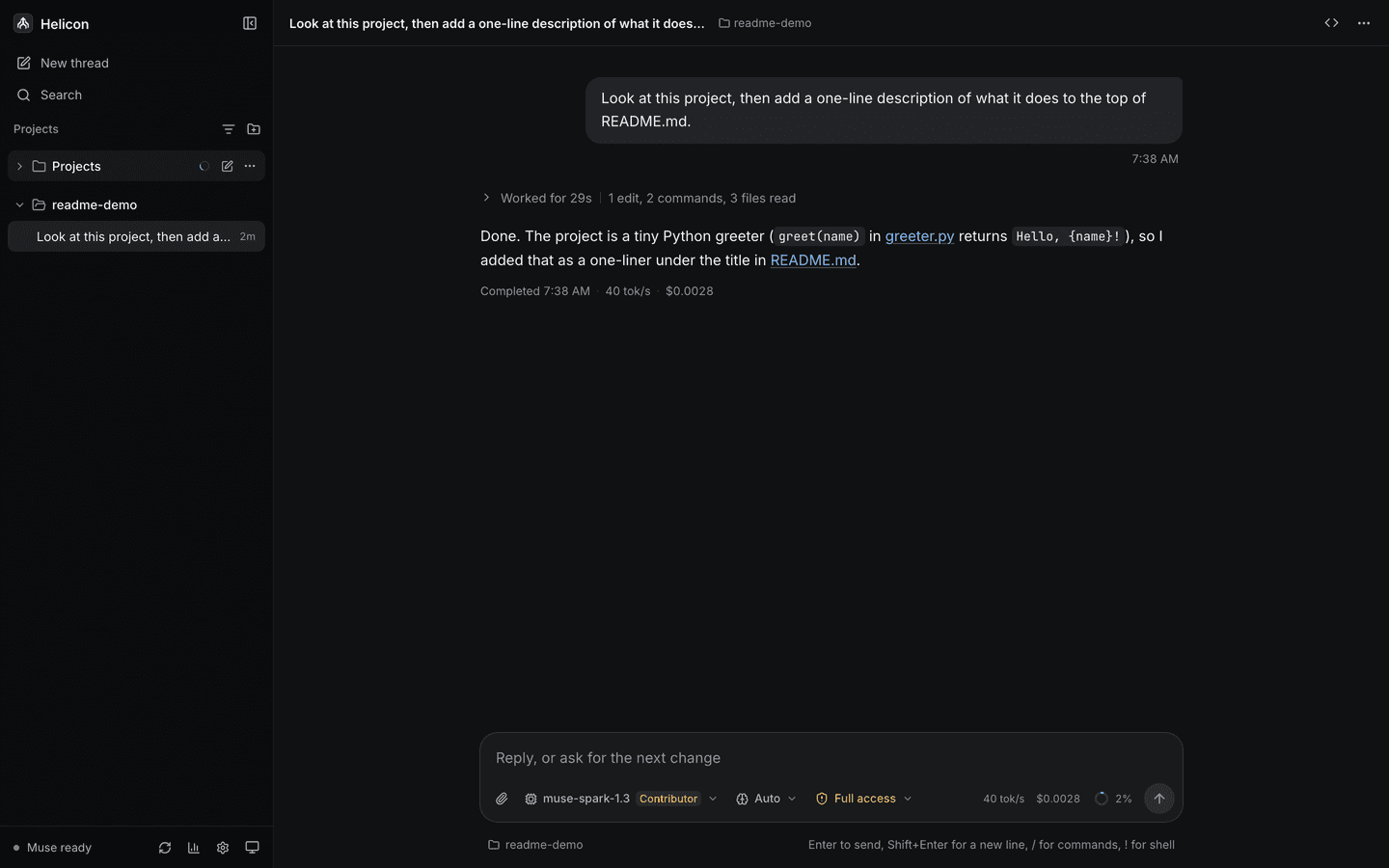
Install a Muse Code GUI in three steps
Install the muse CLI. Every Muse Code GUI drives this CLI. Skip the step if
musealready runs in your terminal. On Windows, download Muse Code with the PowerShell installer instead.curl -fsSL https://dev.meta.ai/install.sh | bashSign in. Authentication stays with your own account. Helicon never stores credentials.
muse loginDownload Helicon. Pick the Windows installer, the macOS DMG for your chip or the Linux AppImage from the install page. It is free and MIT licensed.
The three kinds, and who each is for
| Kind | Example | Best when |
|---|---|---|
| Editor extension | VS Code Muse extensions | You work in one repository inside the editor |
| ACP bridge | Zed and JetBrains bridges | You want one editor panel for several agents |
| Standalone app | Helicon, desktop and web | You run threads across several repositories |
| Other wrappers | Small open-source projects | You want something minimal to modify |
Nobody should claim to be the only option here, and this page does not. Editor integrations exist, several open-source wrappers exist, and they all drive the same CLI. The useful question is which shape fits the way you work.
What does a standalone app add?
The list below describes Helicon. The Muse Code desktop app page has each platform build, and you can try Helicon in your browser on sample data without installing anything.
- A session list across every project on the machine, grouped by working directory, with isolated git worktrees as their own entries.
- Resume for any past session, including ones started in the muse terminal TUI.
- Inline diffs at the turn that produced them, with a file viewer beside the thread.
- An approval queue where onRequest, promptUnmatched and denyUnmatched are mapped one to one and never bypassed.
- Cost at published per token rates by thread, day and model, plus the 5 hour window and weekly cap as Muse Code reports them.
- The same UI as a web app against a daemon on another machine.
What does a Muse Code GUI cost?
Helicon is free and adds no billing: it runs on the Muse Code subscription you already have. It shows what each thread would have cost at Meta's published per token rates, by day, model and thread, as a meter reading rather than a bill. The 5 hour window and weekly cap sit in the sidebar exactly as the CLI reports them. See cost at API rates and usage limits.
What to check before installing any of them
- Does it store credentials? It should not need to. Authentication belongs to your own
muse login. - Does it bypass approvals? A client that auto approves to look smooth has removed the safety property.
- Does it speak the protocol or scrape the terminal? Scraping breaks and cannot see structured events.
- Are the binaries signed? On Windows an unsigned installer means a SmartScreen warning on first run. Helicon's is not code signed yet, and says so.
- Is the source readable? The thing being wrapped has file system and shell access.
Helicon's answers to those five
| Question | Helicon |
|---|---|
| Stores credentials | No. Authentication stays with your muse login |
| Bypasses approvals | No. Allow all is an explicit, dangerous opt in |
| Protocol or scraping | Muse Code Session Protocol, via the official MIT SDK |
| Signed binaries | Not yet. Windows installer is not Authenticode signed and macOS DMG is not Apple notarized; updates are signature checked by the app |
| Source | MIT, one public repository for app, daemon and this site |
Platform support at a glance
| Platform | Helicon | Notes |
|---|---|---|
| Windows | Installer, auto update | Native Muse Code, or WSL2 with path translation; installer not code signed yet, so SmartScreen warns once |
| macOS | Apple Silicon, Intel or universal DMG, auto update | Download picks your chip when the browser reports it; Open Anyway in Privacy & Security on first launch |
| Linux | x86_64 AppImage, auto update | Needs FUSE on some distributions; no ARM build yet |
| Browser | Web app against a daemon | Same React UI, daemon on a machine you control |
When you want the full app, install Helicon on Windows, macOS or Linux.
Frequently asked questions
Does Muse Code have a GUI?
Yes. There is a standalone desktop and web app called Helicon, several VS Code extensions, and Agent Client Protocol bridges for Zed and JetBrains IDEs. All of them drive the same muse CLI.
Is there an official Muse Code GUI?
Muse Code itself ships a terminal interface. The graphical clients are community projects, built on the MIT licensed SDK Meta publishes for the Muse Code Session Protocol.
Do I need a second subscription for a GUI?
No. A client drives your existing muse CLI and your own muse login. Helicon is free, MIT licensed, and adds no billing.
Which Muse Code GUI works best on Windows?
Helicon ships a Windows installer with auto update, runs Muse Code natively with PowerShell for shell commands, and falls back to Muse Code inside WSL2 with two way path translation.
Can a GUI see sessions I started in the terminal?
A protocol native client can. Helicon's daemon discovers sessions for a workspace regardless of which client created them, so terminal sessions are listed and resumable.
Keep reading
- Muse Code desktop appHelicon is a free, open-source desktop app for the Muse Code CLI: Windows installer, macOS DMG, Linux AppImage. Sessions, diffs, approvals and cost in one window.
- Other Muse GUIsAn honest look at the small field of Muse Code GUI wrappers, what separates them, and the specific things to check before trusting any client with shell access.
- T3 CodeT3 Code added a beta Muse Code provider in October 2026, off by default. What it covers next to Helicon: approval modes, terminal sessions, fork and the plan meter.
- VS Code extensionsA standalone Muse Code desktop app compared with running the muse CLI inside VS Code: where an editor panel wins, where a separate session home wins, and how to run both.
- WindowsA Windows installer for a Muse Code desktop app, with auto update. Runs Muse Code natively on Windows, or inside WSL2 with path translation both ways.
- Muse CodeMuse Code is Meta's AI coding agent, used through the muse command line tool on macOS, Linux and Windows. A plain definition, what it does, and how clients connect to it.
Same Muse Code. Same subscription. Better interface.
Free and MIT licensed. Windows installer, Apple Silicon, Intel and universal macOS DMGs, and a web build against a daemon you run.